Quantum bomb detection Worksheet Part 3
Go to task 1: Getting to know the simulation
Go to task 2: Setup without a bomb
Go to task 3: Bomb in the lower path
Go to task 4: Checking Bombs
Go to task 5: Fill in the blanks
Go to Optional tasks
Setup: Quantum Bomb Detection Simulation
Open the website with the “Quantum Bomb Detection” apparatus.
Detect a working bomb without destroying it.
You have a batch of light-sensitive bombs. Some of them are working and will explode when hit by a photon, while others are defective and will not explode.
Can you identify some of the working bombs without causing them to explode? Classically, that is not possible. But using quantum physics – superposition and interference –, it is!
Click on the green goggles to get the following set up.
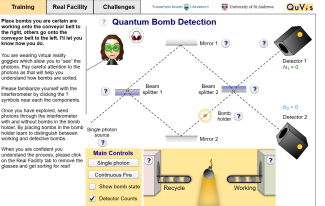
Screenshot: Quantum Bomb Detection Simulation "wearing" virtual reality goggles showing the photons
Task 1: Getting to know the simulation
Have a play with the Simulation for a few minutes, getting to understand the controls and displays. Note three things about the controls and displayed quantities that you have found out.
Task 2: Setup without a bomb 2
Consider the setup when there is no bomb.
- What are the probabilities for detecting the photon in detector 1 and detector 2 respectively?
- Explain whether, after passing beam splitter 1, the single photon is taking both paths simultaneously (superposition), or is actually taking only one path (either the upper or the lower path, but we can't tell which one). Justify your answer by considering the detection probabilities from part 1.
Task 3: Bomb in the lower path
Now, consider the setup with a bomb inserted in the lower path.
- If the bomb is defective, it will not explode when hit by a photon. What are the probabilities for setting off the bomb and for detecting the photon in detector 1 and detector 2 respectively if the bomb is defective. Explain your answer.
- If the bomb is working, it will explode when hit by a photon. What are the probabilities for setting off the bomb and detecting the photon in detector 1 and detector 2 respectively in this case. Explain your answer.
Task 4: Checking bombs
Start checking bombs. You may check the bomb state after firing a photon. Repeat the procedure with several bombs – at least until you detect a photon in detector 2. What does this tell you about the bomb? Explain.
Task 5: Fill in the blanks
Optional Tasks
- Click on the tab
Challenges. Get as far as you can. - Click on the tab
Real facility. Try to correctly identify 10 bombs as working or defective.