Modelling Quantum Entanglement using LEDs

Overview
Overview
Keywords: Quantum state, quantum measurement, quantum entanglement
Age group: 16-19
Required knowledge/skills: no prior knowledge required
Time frame: 45-60 minutes
Author: Elena Poncela Blanco (ES)

Required materials
- Micro:bit (or Calliope mini)
- PC or some device where students can write the program
- Worksheet Modelling Quantum Entanglement using LEDs. Download it here as PDF or docx.
Tasks for the students
The students work in pairs. Every pair of students has a micro:bit with the code already uploaded to it. To execute the program, students will need to press button A several times.
# Imports go at the top
from microbit import *

def button(i, j, k, l):
    leds=[0,1,2,3,4]
    display.set_pixel(leds[i],leds[j],9)
    display.set_pixel(leds[k],leds[l],9)
    sleep(2000)


counter=0

while True:
    while button_a.get_presses()==1 and counter==0:
        counter+=1
        button(0,0,4,0)
    display.clear()
    while counter==1:
        if button_a.get_presses()==1:
            counter+=1
            button(1,0,2,0)

    while counter==2:
        if  button_a.get_presses()==1:
            counter+=1
            display.set_pixel(1,0,0)
            button(3,0,4,0)

    while counter==3:
        if  button_a.get_presses()==1:
            counter+=1
            display.set_pixel(1,0,9)
            display.set_pixel(2,0,9)
            button(3,0,4,0)
            sleep(2000)
            display.clear()
            counter=0
Please note that each LED in the micro:bit is located using two coordinates (x, y).
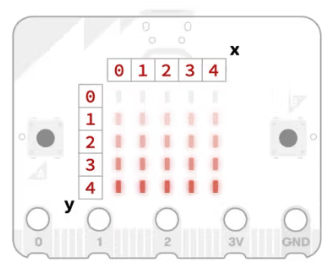
Explain to your students what entanglement is. Emphasize the fact that two particles remain entangled even if they are far apart from each other. You can, for example, have them read the story “Two photons, one story”.
The measurements performed on the qubits are simulated using the states of LEDs in the micro:bit: ON or OFF.
The student’s task is to find out which LEDs (simulating quantum objects) are “entangled”.
Let the students know that in this activity, only two LEDs are “entangled” in such a way that when we “measure” (i.e. check) one of them, the other one will always produce the opposite result. In other words, if one of the “quantum objects” is on, the one “entangled” to it will be off and the other way around.
You can also test the code using a micro:bit simulator.
Solution
| Measurement | LED (0,0) | LED (1,0) | LED (2,0) | LED (3,0) | LED (4,0) |
|---|---|---|---|---|---|
| Measurement 1 | 1 | 0 | 0 | 0 | 1 |
| Measurement 2 | 0 | 1 | 1 | 0 | 0 |
| Measurement 3 | 0 | 0 | 1 | 1 | 1 |
| Measurement 4 | 0 | 1 | 1 | 1 | 1 |
Table 1: Measurement results of the LEDs of the micro:bit on which the above program has been uploaded.
LED (0,0) and LED (2,0) are entangled, since they always have opposite results after a measurement is performed.
Further activity
Challenge your students to program the micro:bits to entangle the “quantum objects” (LEDs) in a different way or using more LEDs and then exchange the micro:bits with another group. The other group must discover which “quantum objects” are entangled.
Share this page